CAMM2 Memory Explained: The Future of Laptop RAM
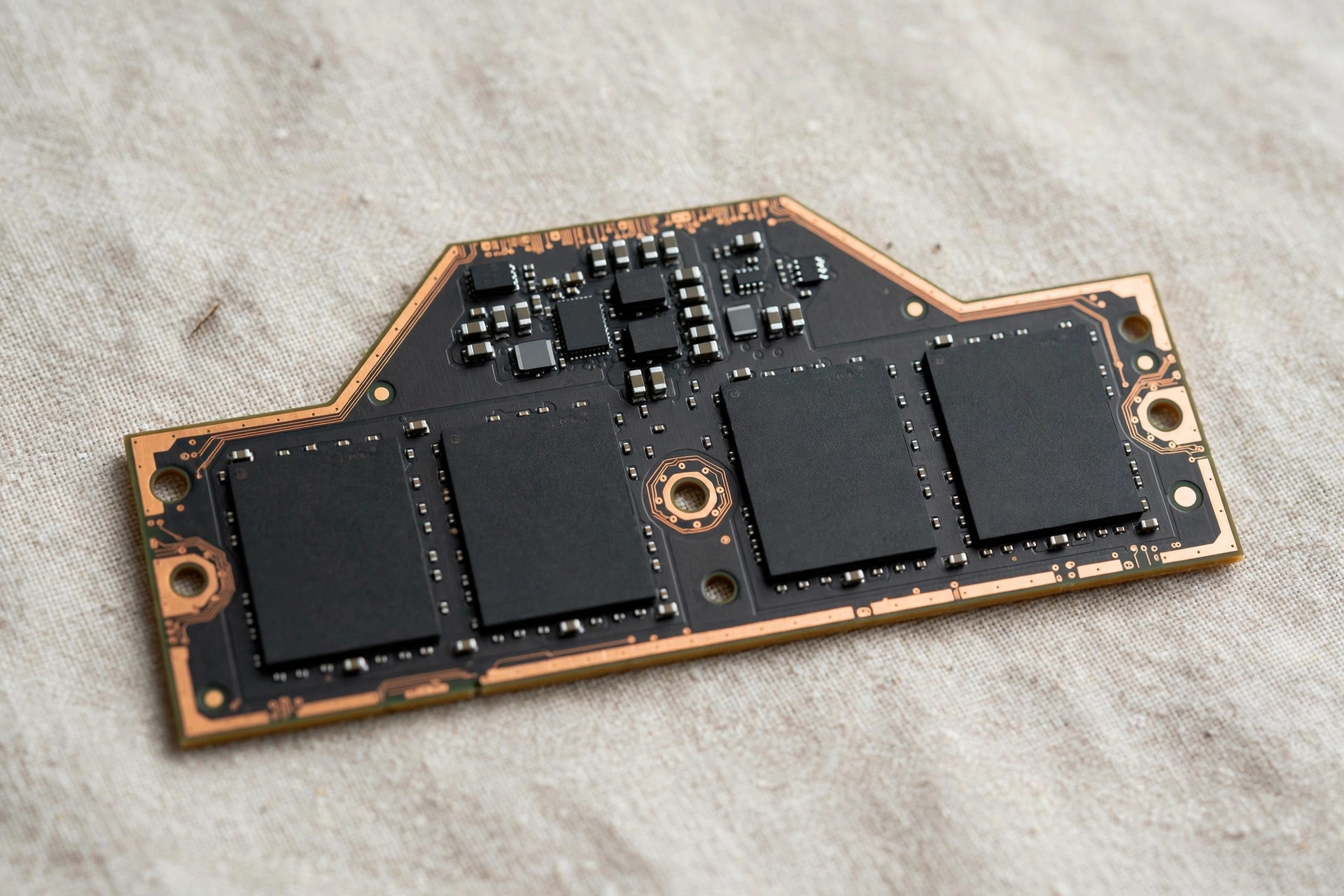
Laptop memory is stuck in a bad compromise. SODIMM slots keep RAM upgradable but are thick and slow; soldered LPDDR is thin and fast but locks you into whatever you bought on day one. CAMM2 — Compression Attached Memory Module, generation 2 — is the industry's attempt to end the trade-off: a memory module that is thinner than SODIMM sockets, faster than SODIMM signaling allows, and still removable by the user. Here is what the standard actually is, where it stands in 2026, and what it means for your next laptop purchase.
What CAMM2 is
CAMM2 is a JEDEC standard (JESD318) for a flat memory module that mounts parallel to the motherboard and connects through a compression connector — a land-grid array pressed against the board by a mounting plate, rather than the edge connector fingers SODIMM uses. Eliminating the tall socket saves several millimeters of Z-height, which is precious in thin laptops, and the shorter, cleaner signal path supports higher speeds than SODIMM's longer traces allow.
Crucially, CAMM2 comes in two electrical flavors on the same mechanical concept: CAMM2 with standard DDR5 chips (upgradable, higher voltage, like SODIMM's successor) and LPCAMM2 with LPDDR5X chips (low-power, soldered-memory performance, but in a replaceable module). The second variant is the headline act: it brings LPDDR5X-class speeds — 7500 MT/s and beyond — to a form factor users and technicians can actually swap.
| Feature | SODIMM (DDR5) | Soldered LPDDR5X | CAMM2 / LPCAMM2 |
|---|---|---|---|
| User replaceable | Yes | No | Yes |
| Thickness | Thickest (socket + stick) | Thinnest | Thin (no tall socket) |
| Speed ceiling | ~5600 MT/s practical | 8400+ MT/s | 7500+ MT/s demonstrated |
| Max capacity/module | 32GB common | Set at purchase | 64–128GB possible |
| Power efficiency | Standard | Best (LPDDR) | Best with LPCAMM2 |
| 2026 availability | Everywhere | Everywhere (thin laptops) | Early adopter models |
LPCAMM2 vs CAMM2: the two flavors in detail
The distinction between the two CAMM2 variants deserves emphasis, because they solve different problems. Standard CAMM2 uses conventional DDR5 chips on the compression-attach module — essentially a thinner, faster-signaling replacement for SODIMM, aimed at machines that would have used socketed DDR5 anyway.
LPCAMM2 is the more disruptive variant. It puts LPDDR5X chips — the low-power memory previously available only as soldered chips — on a replaceable module. LPDDR5X is a different architecture with roughly twice the per-pin bandwidth of DDR5 at comparable clocks, which is why soldered laptops have enjoyed such a speed advantage. LPCAMM2 democratizes that advantage: failed modules are replaceable, capacity can be configured after purchase, and enterprise fleets regain lost serviceability. The trade-off is cost — LPDDR5X chips plus the compression connector price above SODIMM kits and soldered implementations — which is why early LPCAMM2 machines cluster in the workstation and premium enterprise segment.
The compression connector: how it actually works
The connector is the whole reason CAMM2 exists, so it deserves a close look. A SODIMM stick carries gold-plated contact fingers along one edge; those fingers slide into a socket whose spring contacts grip them, and the stick stands at an angle before being clipped flat. The socket's grip mechanism adds several millimeters of height, and the signal travels from the controller, up through the socket's contact springs, onto the module's edge fingers, and finally to the DRAM dies.
CAMM2 replaces that stack with a land-grid array (LGA): flat contact pads on the module's underside sit directly against matching spring contacts on a low-profile interposer soldered to the board. A metal mounting plate, secured with screws in a defined torque sequence, presses the module down with uniform force. If you have ever installed a desktop CPU into an LGA socket, the mechanics are familiar — pressure, not insertion, creates the connection.
Why compression beats edge connectors for signal integrity: the assembly is a fraction of a SODIMM socket's height, so the module lies nearly flush with the board; the routing from controller to DRAM is dramatically shorter than the detour through tall socket springs; and the flat, parallel interface has less parasitic inductance and capacitance than spring-loaded edge fingers — which matters enormously past 6400 MT/s, where every picohenry shows up as an error.
Repairability is a mixed picture. A module swap is a screwdriver job: remove the plate, lift the module, seat the new one, torque the screws. But the fine-pitch contact array is less forgiving than SODIMM fingers — bent pins in the LGA contact field are a board-side failure, costlier to fix than a worn SODIMM stick. Follow the torque sequence and seat the module flat; no wiggling.
Why SODIMM hit a wall: the signaling story
SODIMM's thickness gets the attention, but its speed ceiling is the more consequential problem — and it comes down to physics. Every millimeter of trace between the memory controller and a DRAM chip invites degradation — insertion loss, crosstalk, and reflections. At DDR4 speeds these were manageable; at DDR5 data rates they dominate.
Edge-connector fingers are an impedance discontinuity — a spring pressing a finger is not a clean transmission line. The socket sits at the board edge, forcing long routing from controllers buried in the package, and the two-slot topology creates stub traces that reflect energy back. Beyond about 5600 MT/s the practical ceiling asserts itself: DDR5-6400 SODIMM exists in the spec, but stable operation at that speed on a real laptop board is the exception.
This is why the industry split. Vendors needing more bandwidth soldered LPDDR5X beside the controller with short, matched traces — the gap was not subtle: a soldered LPDDR5X-7500 subsystem delivers roughly 50% more memory bandwidth than a DDR5-5600 SODIMM pair, visible in integrated-graphics gaming, video encoding, and local AI inference. CAMM2's bet is that by flattening the module and compressing the connector, it can recover most of the signaling headroom soldering bought — without soldering. That is how 7500 MT/s became demonstrable on a removable module: the signal path finally stopped being the limiting factor.
What early CAMM2/LPCAMM2 models show
The first shipping wave has been small and concentrated where expected: mobile workstations and premium business laptops, where buyers already pay for configurability. Early LPCAMM2 options up to 64GB delivered LPDDR5X-class speeds, roughly matching soldered LPDDR5X in the same chassis.
Thermals have been the pleasant surprise. A flat module pressed against the board couples heat into the ground planes far better than a stick standing in a socket, and low-voltage LPDDR5X keeps package power modest. Early reports describe LPCAMM2 modules running noticeably cooler under sustained loads than equivalent SODIMM pairs — welcome in thin workstations. The mounting plate doubles as a small heat spreader.
Pricing is the sobering part. Retail LPCAMM2 modules have priced well above equivalent SODIMM kits — a 64GB module has retailed in the neighborhood of several hundred dollars, roughly double 64GB of DDR5 SODIMM at street prices. The premium reflects LPDDR5X chips, connector hardware, and low volume. Availability remains spotty: a handful of SKUs, mostly 32GB and 64GB, with short compatibility lists since each laptop maker qualifies its own modules. Still, single 64GB and 128GB modules have been demonstrated — densities that let a thin workstation carry what previously required two SODIMM slots or a maxed-out soldered build.
Adoption roadmap: what to expect each phase
| Phase | What happened / happens | What it means for buyers |
|---|---|---|
| 2024 — Standard lands | JEDEC published the CAMM2 specification; first LPCAMM2 options appeared in flagship mobile workstations | Proof of concept — interesting to watch, nothing to buy for most people |
| 2025 — First models | More workstation vendors qualified CAMM2; first retail LPCAMM2 modules reached specialty channels | Early adopters only; premium pricing, short compatibility lists |
| 2026 — Workstation expansion | Premium enterprise laptops join in; 64GB/128GB modules demonstrated; connector supply chain matures | Viable for workstation refreshes and serviceable fleets; still not mainstream |
| 2027+ — Mainstream push | Module pricing approaches parity with soldered LPDDR; thin-and-light vendors adopt to answer repairability pressure | The point where CAMM2 becomes a genuine option in laptops ordinary buyers consider |
The gating factor is cost, not technology — the standard, tooling, module designs, and firmware all exist. What does not yet exist is volume, and volume is what turns a premium module into an affordable one. That transition happens when a major thin-and-light vendor commits a high-volume line, most likely when repairability regulation or enterprise demand makes soldered memory more expensive politically than a connector is financially.
Why the industry wants it
The motivation is straightforward: SODIMM is running out of headroom. DDR5 SODIMM signaling tops out around 5600–6400 MT/s in practice, while CPUs increasingly benefit from the 7500+ MT/s that LPDDR5X delivers. Manufacturers responded by soldering LPDDR onto boards — gaining speed and thinness at the cost of user freedom. CAMM2 offers a path back: LPDDR-class performance without the permanence.
There is also a serviceability argument gaining regulatory teeth. Right-to-repair pressure in the EU and several US states is pushing manufacturers toward user-replaceable components, and soldered memory is a conspicuous target. LPCAMM2 lets a manufacturer ship a thin, fast laptop while still being able to say the memory is replaceable — a useful answer to both regulators and enterprise buyers who service their own fleets.
The right-to-repair angle
Memory became a right-to-repair battleground almost by accident. When vendors shifted thin laptops to soldered LPDDR, the side effect was that a failed memory chip turned an expensive laptop into e-waste, and a buyer who underestimated their RAM needs had no recourse. Regulators noticed: the EU's right-to-repair directive entered into force in 2024, France's repairability scoring penalizes non-replaceable core components, and US state laws — New York's Digital Fair Repair Act, California's SB 244, Oregon's 2024 law targeting parts pairing — converge on the same principle: if a component fails, the owner should be able to replace it.
For laptop makers, LPCAMM2 is strategically convenient: it keeps the thin chassis and fast memory marketing demands while checking the "user-replaceable memory" box regulators and enterprise procurement increasingly require. Expect CAMM2 cited in vendor sustainability reports and enterprise RFPs within the next refresh cycle.
The fleet math is concrete. A corporate fleet runs on a 3–4 year refresh cycle, and with soldered memory one failed RAM chip means a motherboard replacement — a depot repair costing several hundred dollars, with the machine out for days. With a replaceable module, the same failure is a modest part and a fifteen-minute desk-side swap. Across a 5,000-machine fleet, the serviceability premium pays for itself well before the refresh ends. Fleets also gain mid-life capacity upgrades: bumping 16GB machines to 32GB in year three is far cheaper than an early refresh — an option soldered memory does not offer.
Will CAMM2 come to desktops?
Technically the CAMM2 specification covers desktop variants too. Practically, desktops are in no hurry — and the reasons are instructive. The desktop DIMM has none of the problems CAMM2 was invented to solve: Z-height is irrelevant inside a tower, and the signaling ceiling that strangles laptop SODIMM does not apply the same way. Motherboards have more routing area, and the industry already answered the speed question with CUDIMM — clock-driver-equipped DDR5 DIMMs pushing past 8000 MT/s on standard slots. A desktop builder who wants extreme bandwidth already has an upgrade path that keeps every existing slot and motherboard layout intact.
Then there is ecosystem inertia: the desktop memory market is enormous and brutally price-competitive, and a new connector means new motherboards, tooling, and validation — to solve a problem desktop users do not have. The one segment where CAMM2 makes sense is small-form-factor and all-in-one PCs, where height constraints genuinely bite. For desktop builders, the standard DIMM slot is safe for the foreseeable future.
Common misconceptions about CAMM2
"It's just soldered RAM with extra steps." Soldered RAM is one vendor's manufacturing decision; CAMM2 is a JEDEC standard with multiple module makers and a defined connector any qualified manufacturer can build to. That standardization creates a real aftermarket and competitive pricing — neither of which exists for soldered chips.
"It will be cheaper immediately." The connector, mounting hardware, and low-volume LPDDR5X modules all cost more today than the mature SODIMM ecosystem. Expect price parity with soldered LPDDR first, then gradual declines as volume grows — a multi-year curve, not a launch-day bargain.
"My SODIMM laptop can be converted." No. CAMM2 needs a motherboard designed around the compression connector — contact field, mounting holes, keep-out zones, and trace routing all differ from SODIMM layouts. There is no adapter and no upgrade path; your current laptop's memory system is fixed at the factory.
"Waiting is always the right move." Only if your timeline is flexible and your target is workstations or enterprise laptops. For mainstream buyers the mainstream CAMM2 laptop is years out. Buy for the present; let CAMM2 be a pleasant surprise in your next refresh, not a reason to suffer with inadequate hardware now.
Where CAMM2 stands in 2026
Adoption is in the early-adopter phase. A handful of mobile workstations and premium business laptops shipped with CAMM2 or LPCAMM2 options, and module availability at retail remains limited — you can buy the concept more easily than the modules. JEDEC finalized the standard, the connector supply chain exists, and memory makers have shown high-capacity LPCAMM2 modules (64GB and 128GB on a single module have been demonstrated), but mainstream thin-and-light laptops have not yet switched over en masse.
Expect LPCAMM2 first in mobile workstations and premium enterprise laptops through 2026–2027, where capacity, speed, and serviceability justify the connector cost. Mainstream ultrabooks follow only when module pricing reaches parity with soldering LPDDR — a cost decision, not a technical one.
What it means for buyers right now
Do not wait for CAMM2 to buy a laptop you need today. The standard's arrival in the specific model you want is uncertain, and early modules will carry early-adopter pricing. Buy based on what is shipping now: if upgradability matters, choose a SODIMM machine (gaming laptops, mobile workstations); if thinness and battery life matter most, accept soldered LPDDR and buy the capacity you will need for the machine's full lifespan.
Where CAMM2 should influence you is fleet and workstation timing. If you refresh enterprise laptops on a 3–4 year cycle, ask vendors about CAMM2 roadmaps before locking in a large soldered-memory order — a replaceable-memory fleet is cheaper to maintain and easier to extend. For individual buyers, treat CAMM2 as a tiebreaker between otherwise equal options, not a reason to delay.
If you are weighing a memory upgrade for your current machine rather than a new purchase, our whether extreme DDR5 speeds actually matter covers the SODIMM reality of today — and our 2026 RAM sizing guide will tell you how much capacity to target regardless of form factor.
Who it's for / who should skip it
CAMM2 matters to you if: you buy mobile workstations or enterprise fleets and value serviceable memory; you want LPDDR5X-class speed without surrendering upgradability; or you are timing a workstation refresh in 2027 and want to evaluate replaceable-memory options.
Ignore it for now if: you are buying a mainstream ultrabook in 2026 (it will almost certainly be soldered LPDDR or SODIMM regardless); you need a laptop this quarter — waiting on an uncertain standard is the wrong trade; or you are a desktop builder, where standard DIMMs are not going anywhere. And remember the generational context: DDR5 vs DDR4 in 2026 is the decision most buyers actually face today, and CAMM2 does not change that math.
FAQ
Is CAMM2 faster than SODIMM?
Yes, potentially much faster. SODIMM signaling practically tops out around 5600–6400 MT/s, while LPCAMM2 modules with LPDDR5X chips have demonstrated 7500 MT/s and higher — bringing soldered-memory-class speeds to a replaceable module.
Can I upgrade a laptop from SODIMM to CAMM2?
No. CAMM2 uses a completely different connector (a compression land-grid array) that must be designed into the motherboard. It is not backward compatible with SODIMM slots — a laptop either ships with CAMM2 or it does not.
Will CAMM2 replace soldered memory in ultrabooks?
That is the industry's hope, but cost will decide. Soldering LPDDR chips is cheap; adding a CAMM2 connector and a removable module costs more. Expect adoption first in workstations and premium enterprise laptops, where serviceability justifies the premium.
What capacities will CAMM2 support?
Single CAMM2 modules up to 128GB have been demonstrated — far beyond typical SODIMM sticks. This makes CAMM2 especially attractive for mobile workstations, where 64–128GB in a thin chassis was previously only possible with soldered memory.
Should I delay my laptop purchase for CAMM2?
No. Availability in mainstream models remains limited and early modules carry premium pricing. Buy the best machine for your needs today — choosing SODIMM models if upgradability matters — and treat CAMM2 as a factor only in workstation or fleet purchases with flexible timing.
Is installing a CAMM2 module harder than a SODIMM stick?
Somewhat. A SODIMM clips into a socket; a CAMM2 module must be seated flat and secured with a mounting plate in a specified screw-torque sequence. Still a screwdriver-level job, but follow the service manual — uneven pressure can damage the fine-pitch contacts.
Does CAMM2 run cooler than SODIMM?
Early evidence says yes. The flat module couples heat into the board's ground planes, the mounting plate acts as a small heat spreader, and low-voltage LPDDR5X chips generate less heat. Under sustained workloads, LPCAMM2 modules have been observed running noticeably cooler than equivalent SODIMM pairs.
Will CAMM2 modules from one brand work in another brand's laptop?
In theory yes — that is the point of a JEDEC standard. In practice, laptop makers qualify specific modules, and mechanical differences (mounting plate dimensions, height clearances) can limit cross-compatibility. Check your laptop maker's qualified-module list before buying a third-party module; interoperability should improve as the standard matures.
Is CAMM2 coming to gaming laptops?
Eventually, but gaming laptops are not the priority — most still ship with SODIMM slots their buyers like, and the segment is less Z-height-constrained than ultrabooks. Expect CAMM2 in gaming machines after the workstation and enterprise rollout.